Screenshots
Screenshot collections of Bitweaver features and themes
Created by: Kozuch, Last modification: 25 Jan 2008 (23:35 UTC)
Installer
Bitweaver has one of the finest CMS installers. It is completely visual, no installing seperate sql files, no cryptic php or mysql errors. The installer checks the necessary settings of your system confirming it is completely compatible and making recommendations when it is not. You can see all the steps of the installer and installation process in this slide show, just click the image: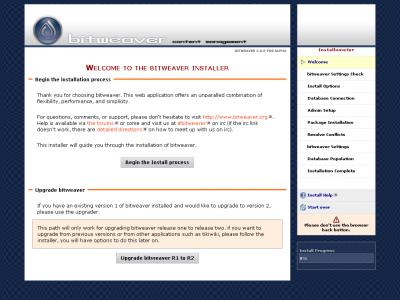
Default Theme: Basic
Our basic theme is as simple as it gets. This theme is like a wire frame. It is a good base from which to build a custom theme. This theme is the default theme in release R2.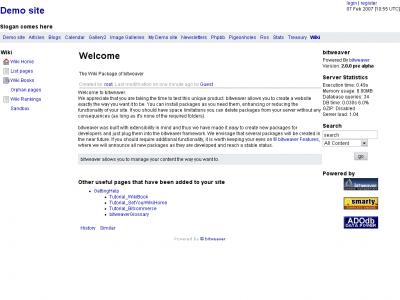
Native Theme
The native theme was default theme in release R1. It remains available in R2 too.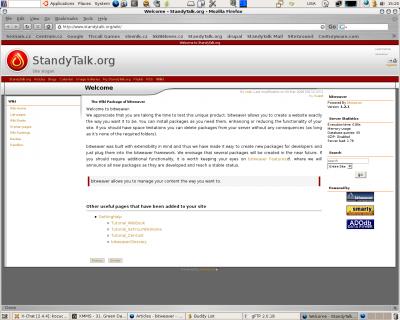
Administrators Menus
Like our installer, our Administration Menus are beautifully designed for ease of use. Check out these slides, just click the image: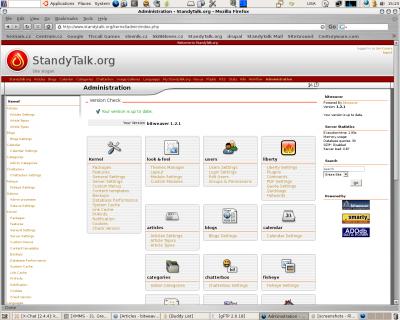
Comments
Oh Wow!
Lookin Good
Nice to hear that!
Re: Nice to hear that!
Looks very interesting.
I will have to try this one.I will install it asap.
Thanks guys.